Showing posts with label Computer Science. Show all posts

Thursday, October 24, 2013

Google Google

You don't search things anymore, you google them. Ever since I began pursuing my higher studies, I've been hearing about the landmark paper - Brin and Page [1998] - sometimes in context, sometimes in jest that its effectiveness was not realised at that time. The fundamental idea - PageRank - found many applications thereafter. The point I'm trying to make is, Google is extremely good at discovering data that its user wants - and as personalised as possible.

One of the more charming aspects of Google, autocomplete, caught my attention. As always, autocomplete is a reflection of popularity of searches with the typed words of your query.

Today is United Nations Day. In the few weeks preceding, United Nations Women had an interesting ad campaign.


These results are region specific. I tried "women should" from my region and a very interesting gem I unearthed was "women should not be educated". Guffawing loudly, I spent an hour reading arguments that convinced me that feminism is very much necessary in this day and age as well. At least, to acknowledge that sexism and a sense of telling women what to do or even discuss what they should be allowed to do pervades global society.


Saturday, May 5, 2012

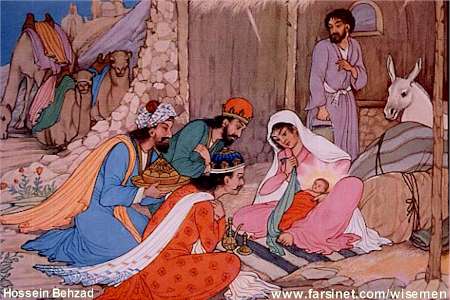
Three Wise Men

A Canadian , a Britisher and an Indian were very worried at different points in time. All three of them were  deeply perturbed by their students' devout prayers for deadline extensions. Each of them, being brilliant, decided to teach their students important life lessons. So they put together a brilliant plan, which involved travelling in the fifth dimension, bringing the Britisher back saying "Mrithyor ma amritham gamaya", and decided that they will strike this nefarious generation born from 1990 - 1993, living in an unreal wold filled with 3D movies, playstations and Harry Potter. So, they wanted to teach life's lessons, they wanted to teach with a bang, they disapproved of the drool on the third-bencher fighting sleep, the glaze on the eyes of the first bencher daydreaming about the pristine presentation and the near-impossibility to discern the eyes of the last-bencher bent on squeezing that smiley into the last message; they wanted these artificially intelligent human beings to face brutal reality. The Canadian wanted to get down to the basics, to the very electrons that course through semiconductors, to delve into the mysteries of the motherboard, relish the advanced computer architecture, break down what was hitherto taken for granted, tear apart compilers, learn numerical methods to ease computations and then publish his research on the world wide web.

All the above was simply a relevant brain teaser between planning and execution for him of course. Meanwhile, the Indian and the ghost of the Britisher had already put the facts into order. All that was left to do was to use his god-like expertise in object oriented analysis and design to bring about a workable product to teach this generation, once and for all, that deadlines are for wimps.

So the Britisher wrote a law, the Canadian published it in his book and the Indian started a university that prescribed the book.

But of course, a book was a tame tool to teach reality, ups and downs. So the master-stroke was announced by the Indian.

Vice Chancellor of my University made students realise the beauty of Parkinson's Law mentioned by Craig Larman by shifting examination timetables.


Ah we are as blessed as Jesus, for instead of gold, frankincense and myrrh, they taught us about guilt, frustration and mirth.


Note:
Explaining a joke is like dissecting a frog, you understand it better but the frog dies in the process. I have no clue what genre am writing, its a mix of satire, fantasy and hyperbole. So those links are the subject am supposed to be learning now but am put off by the ever evasion of the exam. Do see what the Parkinson's Law says, its humorous. And last of all, this is not a joke, its a fact ;-)


Saturday, July 2, 2011

A Tale from Decameron

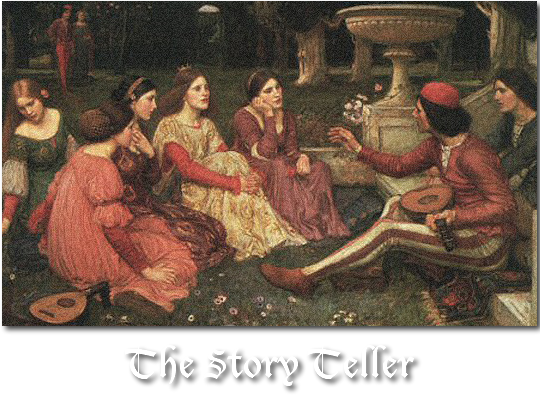
Using Google's reverse image search, I finally found the story behind my blog header. It was simply an image I had googled on Story Telling.


Now I found out that John William Waterhouse, a British Painter born in 1849 painted the painting after naming it "A Tale from Decameron". Decamaron is a medieval Italian story that describes how ten people (seven women and three men) ran away from their homes to escape the plague in Florence. As they fled through the countryside, they decided to tell ten stories each making a total of a hundred story. In all surviving texts, Bonaccio, the author was the first one to introduce the storyteller's story in a story! 


Coming back to John William Waterhouse, he painted this one nearing the end of his life battling cancer. He lived for his art and was recognised rightly so, thankfully, in his own lifetime.

I am really proud to have stumbled across this picture for my blog. I couldn't think of any other picture that could portray the basic idea of my blog, the power of stories any better. I think Google has come up with a wonderful concept. Also, as the title is a tale from Decamaron, I think the story teller is actually telling the story of another story teller!


Monday, June 20, 2011

The Story behind the day Google Failed Me - Designing Chrome Themes

As a Harry Potter fan, who eats off a Harry Potter plate, keeps books in a Harry Potter cupboard and has a Harry Potter wallpaper for her desktop, I ventured into finding the Harry Potter themed Chrome browser.

For the first time in living memory, Google had failed me.

The Chrome Store had nothing to offer for regular members of the witchcraft community like me. I saw two themes, and disliked both of them.


So, as I had an amazing amount of time to kill, I decided once and for all, that I will have a Chrome browser theme for Harry Potter.

Finally,  after relentless Googling, I ended up with making my first customised theme.


The Story behind this result goes like this. A guide by a most relentless person on how to design a Google Chrome theme.

First I accessed the online chrome theme creator by googling it (you could also download it from the chrome webstore).


The first tab was pretty simple for me as it just asks you to give the theme name and description.


Now the images tab was also very explicit. As you mouse-over every option, the indicated portion is displayed in red. I have to upload an image for every section. For some strange reason, even if I simply wanted just a solid colour, (for example black for the highlighted theme_toolbar option), I couldn't specify it in the Colors tab and had to upload an image for every portion.

Thus, for the theme_ntp_background, I uploaded the Harry Potter wallpaper.


Then, for each colour, I had a square tile 120x120. The minimum height is 119 pixels. (Learnt that after many disastrous results!). I found that a nice way of choosing colours is to use them from the picture using the dropper tool. 


Thus, I used this picture for the theme_toolbar.


Continuing in a similar vein, I ended up with this layout.


Now I realised that I can't make out the text at all. Later I found that the next tab, Colors, takes care of that. 


Unfortunately, all the colours are specified in hex codes.

To know the hex codes of the colour I used the Dropper tool in GimpShop. Then, I filled the frame option with the exact code corresponding to the image I have uploaded.


So, the hex code is 001B22. I set this for the frame portion. Now the Colors tab is not very clear about the respective placeholder of each option. The frame refers to the place behind the tabs which has already been given an image. Frame inactive is the same region but when the window is inactive. I later learnt can give the colour you want straightaway or give the same colour as the fame active and tint it light or dark using the Tints tab. The same applies for the tabs in incognito mode. Now the toolbar option is a little tricky.


The toolbar option affects the arrows, the status bar at the bottom, and the background of the bookmark panel. Also, I had to choose a dark colour to complement the grey in the status bar. I still haven't figured out how to change that font colour. However, the code is open source and the more HTML zealots can try it out. And the arrows' colour  jar at the moment but I found that they could be easily tinted in the next tab.


In the above screenshot, I have changed all the required font colours. Now, the ntp_header option refers to the background colour of the border in the most visited section. It is not visible in the preview. I've taken a screenshot from the final result for the idea.


The next three options refer to ntp_section. That is the region that is highlighted when you mouse_over the apps.


So then, I chose the appropriate colours for the background, text and link. Sometimes, the changes of text are not reflected in the preview but they are faithfully reproduced finally. The last two options refers to the control buttons (minimize, restore and close).

Next, we come to the tints tab. Here, I just chose the colours that I would like to tint (or add onto) the ones I had already chosen in the previous Colors tab. Sometimes, when I did not want a tint, I chose the exact same colour as before. Also, as I wanted the buttons to be grey, I tinted them so. 


And finally, in the last tab Pack and I chose to apply the theme. But later I learnt it is wise to regularly download zip file and then upload it for changes. Otherwise, I had to start from scratch even if I just wanted to change one parameter.


And I am just enjoying my new creation. 


P.S. I can't wait for the release of the last Harry Potter film!
And, I think my tenses went awry because I have edited this post near twenty times juggling between past and present.


Thursday, April 14, 2011

Backtracking - my usual state of mind

This semester we learnt a charming little algorithm for solving problems known as backtracking. The method is simply to keep taking a choice at every level and "backtracking" or abandoning that level if you know that's not going to give you the solution.

The typical example where you try to place 8 queens on a 8x8 board such that they do not attack each other.

So you'll place the queen on first row, first column. The second will be second row, first column. Not possible as they have the same column, so backtrack.  Then, second row,second column. Diagonal attack. Backtrack.

You get the idea. A simple case of combinations.

No, I will not sound like the Miss Minchin from The Little Princess and carry on my academia. What I wanted to connect it with is my brain!

I just realised my entire thought process is a simple case of back-tracking. Of course in life, I can't simply take yes/no choices. I have a "we'll see" and a "maybe" and so on and so forth. But just imagine, for a time being you'd boil everything down to yes or no.

My answer "state", that is the wanted level is "Am happy". And I begin with a state "taking a break". "B" stands for backtrack.


Ha ha! Am pleased how this turned out. I've resized the image the best I can. Do left-click on it. And you can't use "greedy" here because the best solution at each step won't exactly lead to an answer. I shall now go on a self-imposed hiatus. Wish me luck guys for my exams.

Sunday, December 5, 2010

Presenting... My first Presentation

The presentation on William Wallace was my very first and I had lots of help from my father. I owe a lot of my presentation skills to my father. So this post is dedicated to my dad.

First let me give a little background. The presentation was due on Monday. Me and my friend had planned to do it over the weekend on Environment. She faced a family situation, her relatives had come from abroad and she couldn't make it. I was very low in spirits as I had no idea what to do. Two days, one presentation. My dad came to my rescue and gave me confidence.

Research: We surfed a lot of websites (this was before Wikipedia arrived) and collected a sizeable chunk of information and pictures.

Organisation: My dad said we needed to categorise all that we needed. He said that but didn't get to it. I asked him why? And I got a mumbling from which “no mood” was highly audible. I was kind of confused when I realised what he was doing. He was searching templates. His favourite technique to really get into the presentation was to spend some time on its appearance. Its a golden rule I've always followed. Finally, we made about twenty slide headings in Lucida Blackletter font. Then, we racked our brains for a title and finally the “Scottish Pride” was chosen. The template was the one with spectacles on the title slide and parchment feel to it.

Layout: Never have too much text. That's another nugget I learnt. I had real fun during this session. I mean William Wallace had a five-foot long sword and there was slide dedicated to that alone. There was another one where I mentioned Age of Empires too.

Sound: The soundtrack was Age of Empires || open. Also, I recorded my voice for all the text in the slides. Ah, all the trouble I went through.

The Scottish Pride”
You're supposed to sound proud not sleepy
The Scottish Pride”
Louder, even I can't hear.
The Pride.. chi.. Scottish”
What was the Scottish for?
The Scottish Pride”
Perfect! But the fan is too loud, let me switch it off.

The final slide has a neat little custom animation with a curtain descending and my dad added the clap sound effect.

I went to the AV room. I switched off the lights. I started it and sat down, everything was automatic.

The claps drowned the digital ones.

Thursday, November 25, 2010

Me

I was just thinking if I had to describe myself in computer terms, how I would do it. Here goes:

I'm a single-tasking, hyper-threading, multi-core microprocessor with teraflops speed and terabytes of memory.